Mioverse™ Architecture

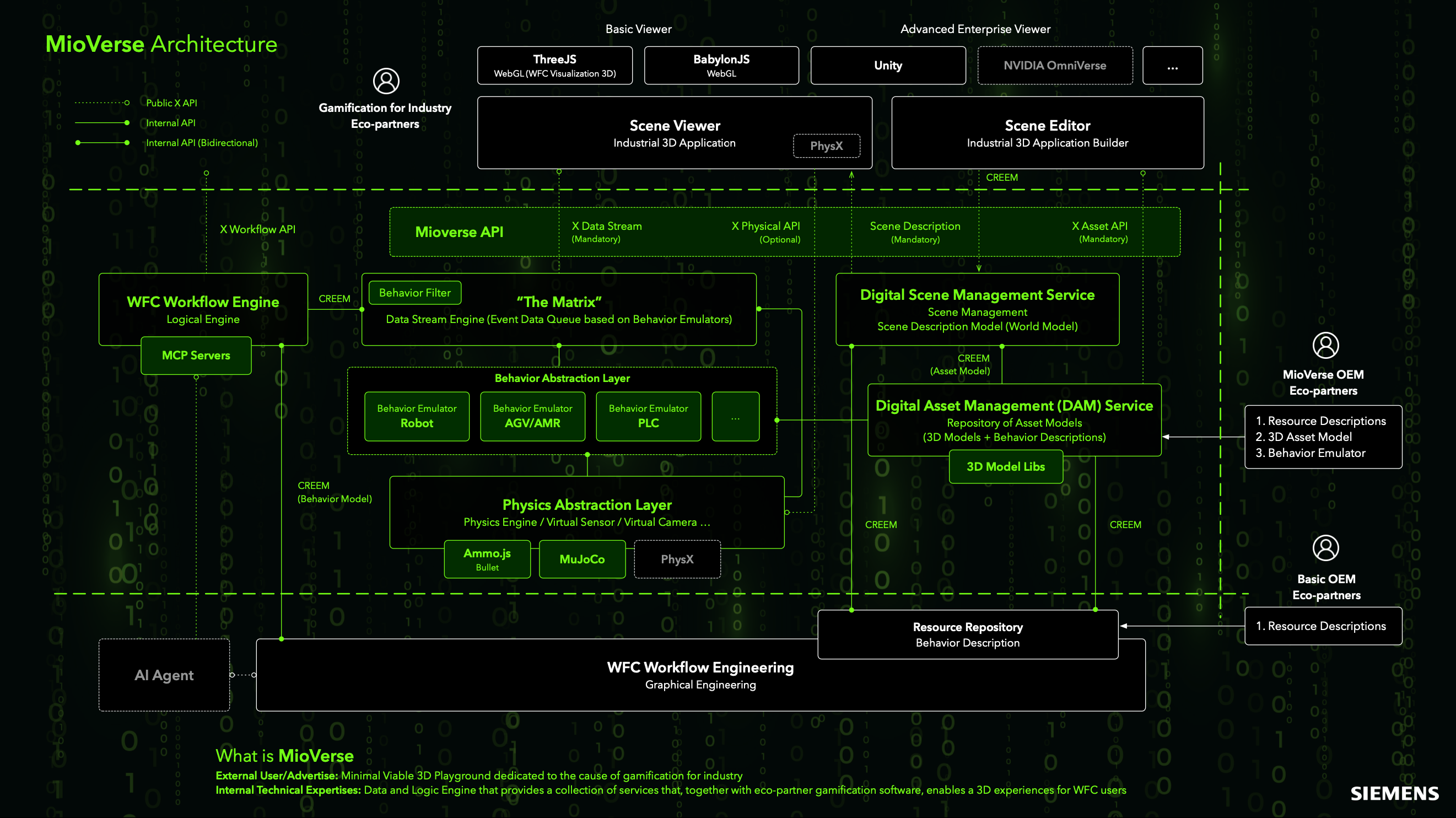
The MioVerse Architecture separates industrial 3D visualization, simulation, data streaming, asset management, and IT/OT workflow orchestration into service layers.

At the top layer, MioVerse supports scene viewers and scene editors. Web clients can use Three.js or BabylonJS; other clients can use Unity or NVIDIA Omniverse. These viewers consume standardized scene descriptions, asset definitions, and data streams to render and interact with industrial 3D applications.

The core integration layer is exposed through the MioVerse API, which provides mandatory interfaces for data streaming, scene description, and asset management, as well as optional physical APIs. This API layer separates visualization clients from execution, data, and simulation services. A client can change without requiring the underlying services to use the same rendering stack.

Dynamic behavior and event data are managed by "The Matrix", a centralized data stream engine that functions as an event-driven queue based on behavior emulators. It aggregates runtime signals produced by robots, AGVs/AMRs, PLCs, and other industrial entities through a dedicated behavior abstraction layer. The layer keeps events in sequence and maps them to a consistent semantic model.

Beneath this layer, the physics abstraction layer integrates multiple physics engines and virtual sensing technologies, such as Ammo.js, MuJoCo, and PhysX, to model motion, collision, and perception. This allows physical behaviors and virtual sensors or cameras to be treated as first-class data sources.

Static and semi-static knowledge is governed by the Digital Scene Management Service and the Digital Asset Management (DAM) Service. These services maintain world models, scene descriptions, asset models, and associated 3D model libraries, linking structural definitions with reusable behavior descriptions via standardized resource identifiers.

On the orchestration side, the WFC Workflow Engine provides a logical execution environment for IT/OT integration workflows, while WFC Workflow Engineering enables graphical authoring and lifecycle management of behaviors and control logic. AI agents can query this layer for scene context and submit actions through governed workflow interfaces.

MioVerse connects visualization and physics simulation to runtime data and workflow logic. Internal teams and partners can use the same interfaces to build digital-twin applications or game-like industrial training scenes.
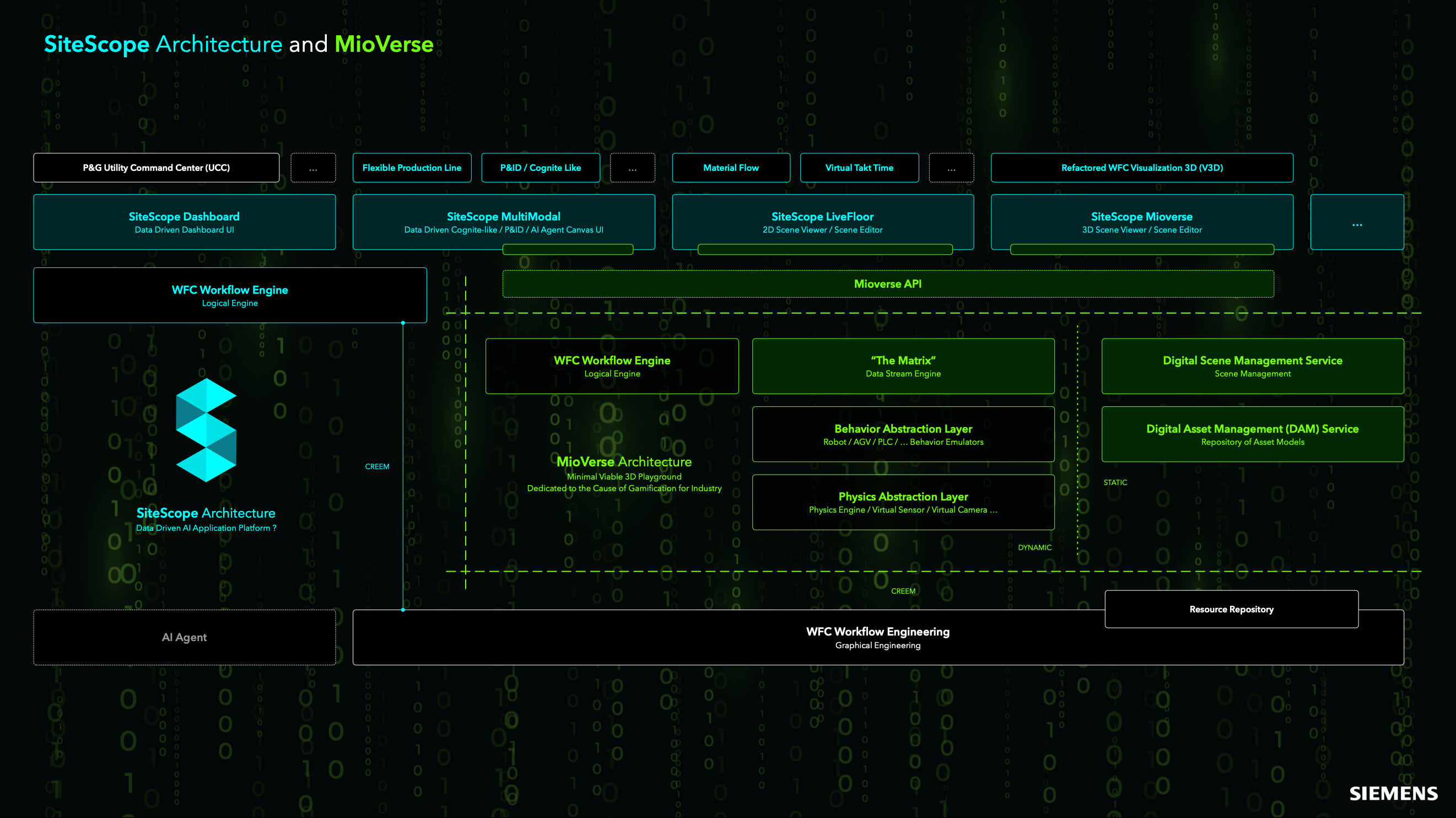
SiteScope for Mioverse™ Architecture
MioVerse - Data Continuum

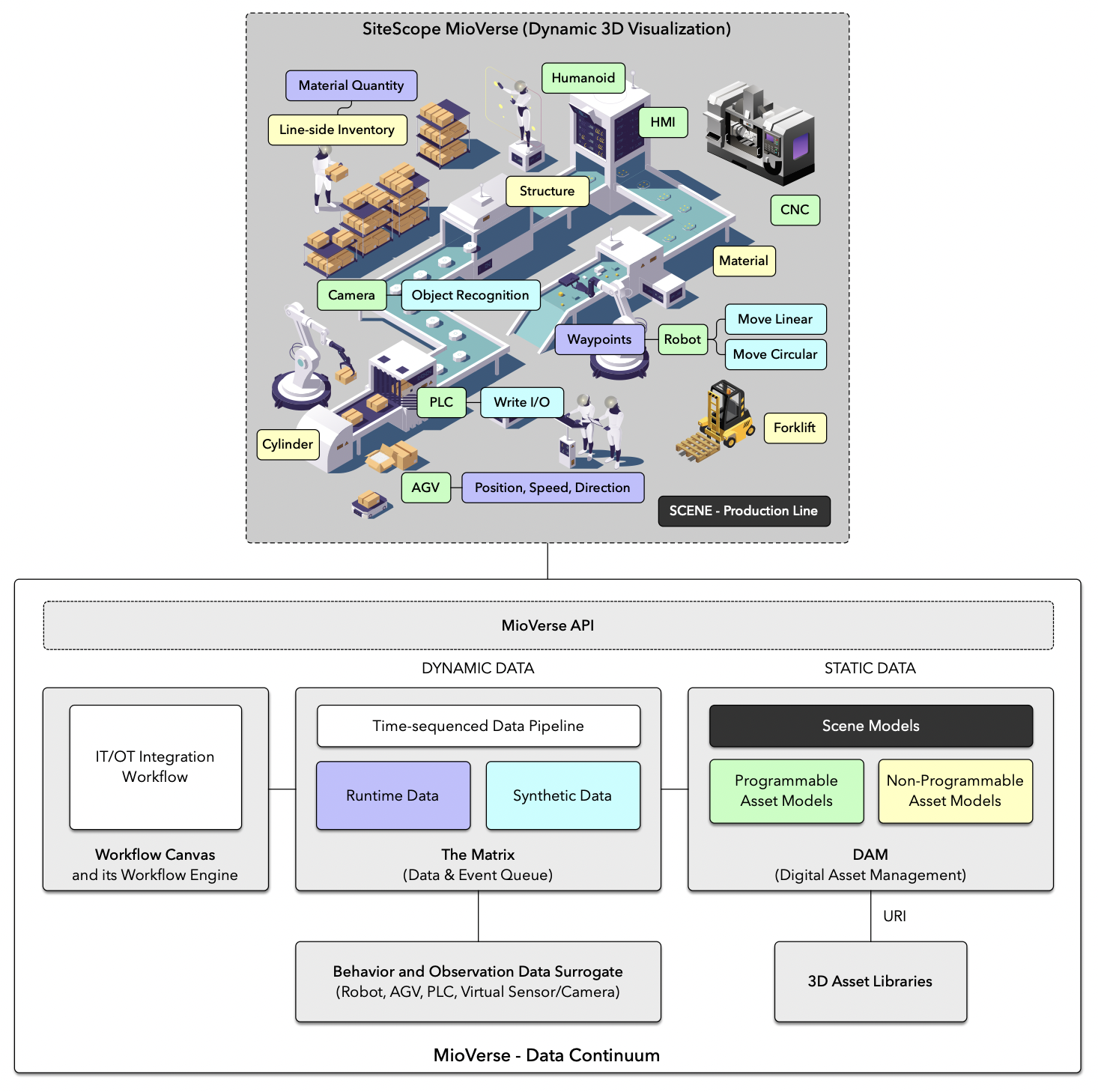
The MioVerse - Data Continuum diagram shows how dynamic 3D visualization connects to IT/OT runtime data, synthetic data, and managed asset definitions.

At the top layer, SiteScope MioVerse (Dynamic 3D Visualization) displays a production-line scene composed of heterogeneous industrial assets, including robots, CNC machines, PLC-controlled devices, AGVs, forklifts, cameras, HMIs, and humanoid operators. These assets are modeled both geometrically and semantically, exposing properties such as structure, material, inventory, waypoints, motion primitives (e.g., linear and circular movement), and operational states. The scene is a shared spatial and semantic context for real-time robot motion, AGV navigation, PLC I/O, sensor perception, and object recognition.

The visualization layer is decoupled from data generation and orchestration through the MioVerse API, which bridges the scene with the underlying data infrastructure. Below this interface, the architecture distinguishes between dynamic data and static data.

Dynamic data is managed by a time-sequenced data pipeline, referred to as The Matrix, which functions as a unified data and event queue. It aggregates both runtime data sourced from physical systems and synthetic data generated by simulations or virtual sensors. This design enables temporal alignment, event-driven processing and repeatable replay or augmentation of industrial behaviors.

Static data is managed through a Digital Asset Management (DAM) subsystem, which maintains scene models and asset models. These include both programmable assets (e.g., robots, PLCs, AGVs) and non-programmable assets (e.g., passive structures, materials), each referenced via URIs and linked to reusable 3D asset libraries. Structural and semantic definitions can therefore remain versioned separately from runtime behavior.

On the orchestration side, an IT/OT Integration Workflow, implemented via the Workflow Canvas and its workflow engine, coordinates data flows, control logic, and system interactions across enterprise IT systems and operational technology.

At the lowest layer, behavior and observation data surrogates provide a common interface for physical and virtual entities such as robots, AGVs, PLCs, and virtual sensors. The interface covers data acquisition, simulation, and control.

The MioVerse Data Continuum keeps static asset knowledge, real-time operational data, and synthetic behavior data under a shared set of identifiers and interfaces. Applications can use these inputs for digital twins, closed-loop simulation, and production analysis.

Implementation Roadmap

The SiteScope Mioverse delivery path starts with reusable semantic assets. Engineers bind them to WFC resources, drive them with Matrix event streams, and validate them in 3D simulation before connecting real IT/OT systems.

01 · Asset Preparation CAD → DAM

Segment large CAD or BIM models into production-line building blocks, simplify geometry for web rendering, normalize coordinate systems, and publish each object into Mioverse DAM with stable asset IDs.

  • Create reusable geometry units: robot cell, CNC, warehouse rack, conveyor, door, fixture, camera, AGV station.
  • Attach metadata: asset class, material, bounding box, mounting point, URI, version, and scene placement constraints.
02 · Scene Composition DAM → V3D

Open SiteScope Mioverse, connect to the DAM library, and assemble the virtual production scene through drag-and-drop placement. Each object also acts as a semantic anchor for resources, events, and workflow logic.

  • Place building blocks with grid snapping, local coordinate frames, and scene hierarchy rules.
  • Register animation templates such as door open/close, storage lift, robot posture, conveyor motion, and material handling cycles.
03 · Resource Binding WFC + CREEM

Build the WFC resource tree and bind each 3D block to a Resource Description. This step turns the scene from a picture into an executable namespace graph where visual objects and runtime entities share identity.

  • Map 3D asset URI to RD namespace, equipment class, device connector, and operational capability.
  • Bind FB ports to Matrix topics, PLC tags, robot commands, AGV waypoints, and virtual sensor output.
04 · Behavior Emulation V3D → Matrix

Generate time-sequenced event streams from virtual behaviors. Matrix receives robot kinematics, AGV trajectories, PLC lookup-table state changes, sensor observations, and physics events as replayable industrial data.

  • Robot: forward/inverse kinematics, TCP path points, posture states, collision zones, gripper state.
  • AGV/AMR: route graph, waypoint occupation, traffic conflict, load state, charging behavior.
  • PLC/HMI: I/O triggers, LUT-driven actuator state, alarm flag, interlock and permissive state.
05 · Workflow Validation Simulation → Runtime

Author the WFC workflow and test it with virtual devices first. Replace each emulator with a real connector only after its branch, timing, and failure behavior have been checked. This keeps the transition to production integration traceable.

  • Validate workflow branches, timeout behavior, retry strategy, exception handling, and operator intervention points.
  • Compare the virtual Matrix timeline with physical runtime data for replay, diagnosis, and later tuning.